
 +91 9925 9925 99


Gemini for Everyday Work: A practical adoption and productivity series for Teams

Gemini for Google Workspace is Google’s AI built into Gmail, Docs, Sheets, and Meet. Your team already knows, so drafting, summarizing, and searching happen where the work lives. This guide covers how to tell where Gemini genuinely helps and where it doesn’t, which questions to settle before anyone gets a license, and what moving your email across really involves.
Yukta, Meridian’s operations manager, has a supplier thread with forty messages. Somewhere in it are two changed delivery dates, a price negotiation, a follow-up question, and a decision waiting on her. An AI assistant could handle it faster. Her team of 80 has been saying as much for months.
Then the questions begin. Where do you start when everyone works from personal Gmail accounts and shared spreadsheets? What will it cost for 80 people? Is it safe to give an assistant access to supplier contracts and payroll? And if something breaks on a busy workday, who do you call?
If that sounds familiar, you’re in good company. Most growing teams don’t lack interest in AI. What they lack is a clear path from where they are today to where Gemini becomes genuinely useful. This guide is that path, taken one honest question at a time, and we’ll keep returning to Meridian, a fictional entity, so every answer stays practical.
Start where you are
- Developers and tech teams: Start with Modules 3, 4, and 6.
- E-commerce teams: Start with Modules 3, 4, and 5.
- Planning for 50–100+ licenses: Start with Modules 2 and 5.
- Moving off personal email: Start with Module 7.
- Weighing your options: Start with Module 8.
- Tech partners: Start with Modules 5 and 9.
Gemini for Google Workspace Explained: Key Differences From Personal Gemini
Gemini for Google Workspace is the AI built into Gmail, Docs, Sheets, Slides, Drive, Chat, and Meet. It works with your team’s emails, files, and meetings, helping where the work already happens rather than in a separate chat window.
The key difference from a stand-alone chatbot is context. Instead of copying information into a separate tab, Gemini can assist within your company’s Workspace environment, under your organization’s admin controls.
Many people first try Gemini through a personal Google account. That is a good place to experiment, but it is not the same as a business account. The difference matters once real company information is involved.
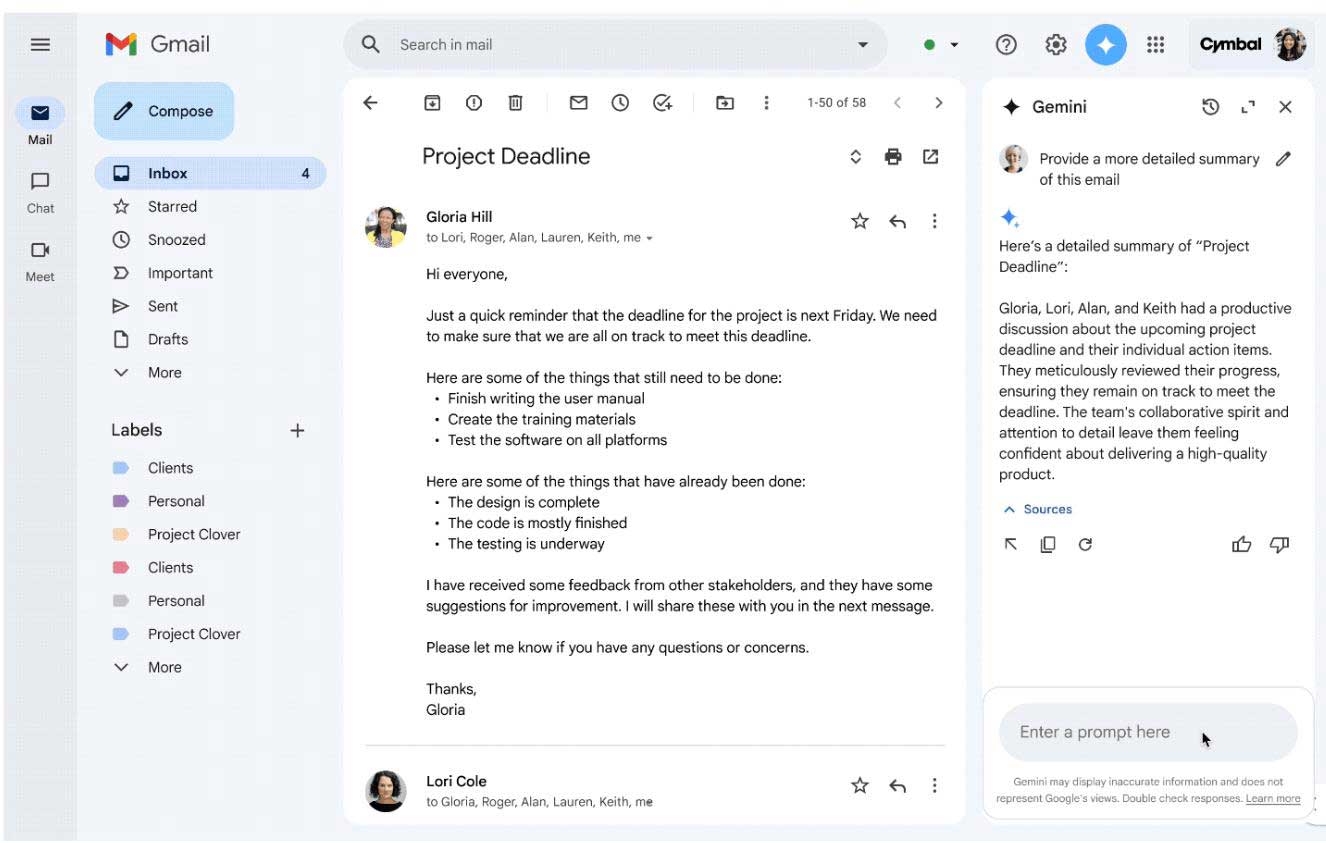
Back to Meridian…Yukta is not sure what to expect from another AI tool. Then she opens the forty-message supplier thread, asks the side panel for a summary and the questions still awaiting her decision, and sees that the delivery date has changed twice. Before replying, she checks both dates herself. Gemini gets her to the right information faster, but the decision stays with her.
Once you know what it is, then comes the natural follow-up question that every finance director would ask, what does it cost, and is it worth it?
Is Gemini for Google Workspace Worth It for 80 Users?
Google sets the price of Gemini as part of its Workspace plans, which are billed per user, and a partner prepares the quotation without changing that price. Whether it’s worth it comes down to one comparison: what each seat costs against the working time it hands back.
Google now includes Gemini in its Business and Enterprise plans rather than selling it as a separate subscription. The catch is that the depth of Gemini varies by plan, so choosing a plan is also choosing how much of Gemini each person gets. Plans are commonly bought on an annual commitment, often paid in advance, plus GST, so it’s worth asking any partner how that works before you commit.
| Plan | What to expect from Gemini | Tends to suit |
|---|---|---|
| Business Starter | Gemini in Gmail and the Gemini app, with other apps more limited | Small teams starting with business email |
| Business Standard | Gemini extended across Docs, Sheets, Slides, Drive, Meet and Chat | Teams that draft, analyze and meet in Workspace every day |
| Business Plus | Everything in Standard, plus added security and archiving | Teams with retention or compliance needs |
| Enterprise | Quoted individually | Larger or more complex organizations |
For example, if a Google Workspace Gemini licence costs ₹1,000 a month and an employee’s time costs the company ₹500 an hour, Gemini only needs to save that person two hours a month to cover its cost. That is about 30 minutes a week. These are simplified figures to show the logic, not an actual quotation.
Who might wait:
If no one can name two or three tasks Gemini would speed up, if most daily work happens outside Google Workspace, or if the team will not have time to learn it, it may be better to wait. If your team is not yet on a managed Workspace account, set that up first; Gemini works on top of it.
Back to Meridian…
The finance lead models two scenarios
- 80 licences at once
- A 20-licence pilot covering operations, support, wholesale sales, and the tech lead.
The pilot costs a quarter as much. He goes with the pilot, with one rule: expand only where licence clearly breaks even. Before signing, he also asks how adding a licence mid-term works.
A price only makes sense against the hours it returns, so where do those hours actually come from?
Where Does Gemini Save Time In The Apps You Already Use?
Gemini saves the most time on three steps of everyday work: reading long material, producing a first draft, and finding things. It saves less time where judgment or accuracy decides the outcome, so every output still needs a person to check it.
Each example below follows the same pattern: the daily pain, a prompt you can copy, what comes back, and what to check. Which features you see depends on your plan and your admin’s settings.
1. Gmail: The Reply That Has To Be Exactly Right
- Pain Point: a long supplier thread and a reply where one wrong date costs money.
- Prompt: “Draft a polite reply to the supplier confirming the final delivery date from this thread and asking for the agreed price in writing.”
- What you get back: a short draft in the thread’s tone, ready to edit.
- Check: every date and amount against the thread.
2. Docs: The Blank Page
- Pain Point: a returns policy nobody has written yet.
- Prompt: “Draft a one-page returns policy for a home-goods brand: seven-day window, unused items, original packaging. Match the tone of our shipping policy.”
- What you get back: a structured first draft that can mirror the style of an existing Drive document.
- Check: the terms are yours, so whoever owns the policy should review them.
3. Sheets: The Weekly Report
- Pain Point: wholesale orders in a raw sheet and nobody comfortable with formulas.
- Prompt: “Create a table of last week’s wholesale orders by product category, and add a formula that totals revenue for each category.”
- What you get: a table and a formula you can inspect.
- Check: totals against the source data, on a few rows by hand.
4. Slides: The Festive-Season Pitch
- Pain Point: a wholesale pitch due in two days.
- Prompt: “Create a six-slide pitch for our festive collection: the range, pricing tiers, delivery timelines, and a closing ask.”
- What you get: a draft structure and layouts to refine.
- Check: Gemini doesn’t know your real prices or promises unless you supply them, so add and verify them yourself.
5. Drive: the file you know exists
- Pain Point: the supplier agreement is somewhere in a shared drive.
- Prompt: “Find our current supplier agreement for the ceramics range and summarize the delivery and payment terms.”
- What you get: the file and a summary of its terms.
- Check: open the original before acting on any clause.
6. Chat: the day you missed
- Pain Point: back from leave to dozens of unread messages.
- Prompt: “Summarize the unread messages in the support space and list any action items for me.”
- What you get: a short catch-up with follow-ups pulled out.
- Check: spot-check anything with a deadline.
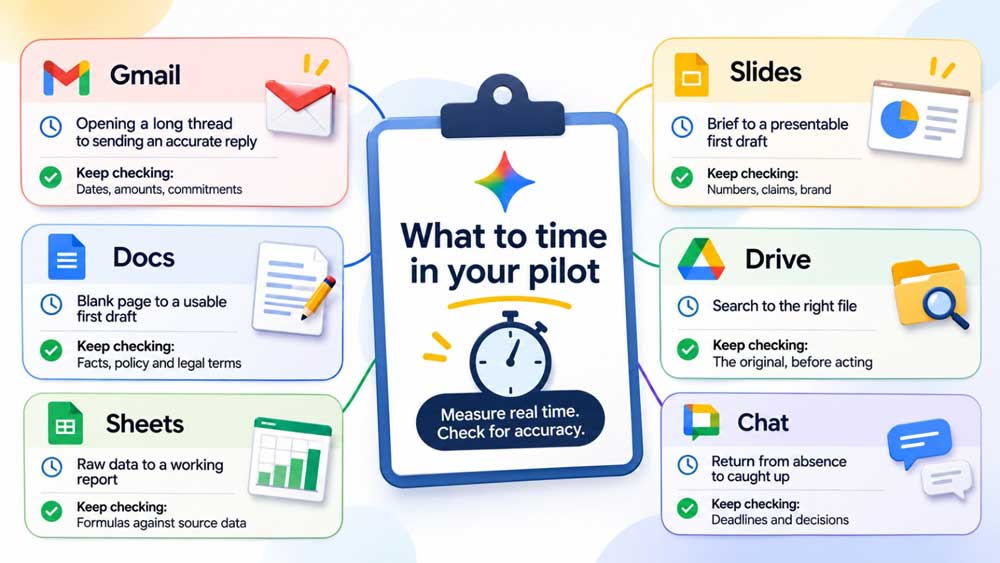
Time the same task, with the same person, before and after for two weeks. Your own numbers will persuade your team more than anyone else’s percentage.
For tech teams, A tech lead pastes rough change notes into Docs and asks for plain-language release notes for support. Every technical statement still gets reviewed, and credentials, keys, and customer data stay out of prompts.
For e-commerce teams, in Gmail, a delayed-order reply can draw on the returns policy sitting in Drive. A person still reviews the tone and any promise before it goes out. In Sheets, Google describes AI-assisted tools for text tasks such as tidying product titles; check its current Sheets help for what your plan includes.
Apps describe how one person works, but teams have different daily pains, so who benefits most?
How Do Different Teams Use Gemini Day To Day?
Teams get the most from Gemini by starting with the repetitive task that eats their week: follow-ups in sales, onboarding paperwork in HR, month-end reports in finance, and first-draft replies in support. In each case, Gemini produces a first pass, and the team’s judgment finishes it.
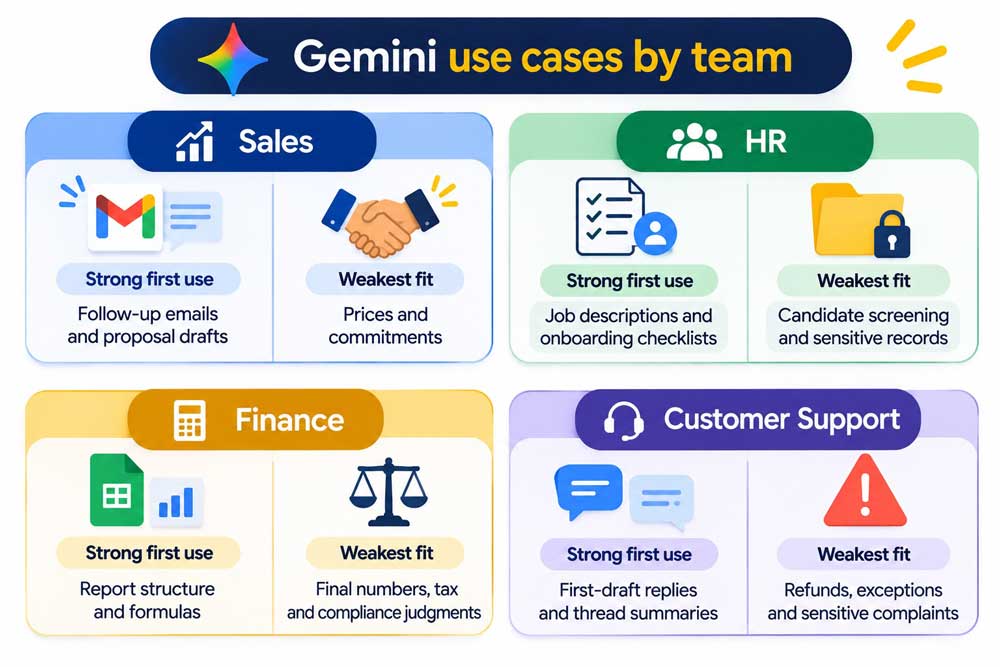
Sales: follow-ups that don’t slip
The pain: when the pipeline is busy, follow-ups and proposals wait.
- In Gmail, summarize the buyer’s thread.
- Draft the follow-up that answers their open questions.
- In Docs, turn call notes into a proposal draft.
Prompt: “Summarize this thread, then draft a follow-up that answers their two open questions about delivery timelines.”
HR: onboarding without the admin load
The pain: a small HR team carries hiring, onboarding, and everyday employee questions. Draft a job description from a short role brief. Build a first-week checklist in Docs. Draft the welcome email.
- Draft a job description from a short role brief.
- Build a first-week checklist in Docs.
- Draft the welcome email.
Prompt: “Draft a first-week onboarding checklist for a warehouse packing role, including who to meet and what to read.”
Finance: reports that start structured
The pain: a backlog after a sale, and replies that sound different depending on who writes them.
- Draft replies that draw on the returns policy stored in Drive.
- Summarize long customer threads.
- Use a Chat summary to hand over between shifts.
Prompt: “Create a table of monthly expenses by category from this sheet and add a formula showing each category’s share of the total.”
Good workflows on paper don’t guarantee anyone will use them, which is why adoption is worth planning before the first seat is bought.
How Do You Plan Gemini Adoption Before You Buy?
Plan adoption before purchase by naming two or three repeat tasks per team, choosing one champion in each, scheduling short task-based training, and deciding what you’ll measure. Teams that skip these steps tend to buy licences that quietly go unused.
Rolling out Gemini for Google Workspace is less like installing software and more like introducing a new working habit, and habits need a first easy win.
Imagine Meridian skips the planning. Licences are assigned on a hectic day, an announcement email goes out, and a month later the admin report shows most people at zero. Nobody was careless. Nobody knew which task to try first.
| What goes wrong | What it looks like | What to set up before buying |
|---|---|---|
| No use cases | “It can do anything” turns into “I don’t know where to start” | Two or three repeat tasks per team |
| No champions | Nobody to ask, nobody to show a good prompt | One curious person per team |
| No training | People try once, get a vague answer, and stop | Two short sessions built on real team prompts |
| No measurement | Nobody can say whether it’s working | A scorecard and a review date |
A pre-purchase adoption plan in five steps
- List two or three repeat tasks per team, drawing on the workflows in the earlier modules.
- Name one champion per team. Pick someone who enjoys trying things, not necessarily the most senior person.
- Create a group for each team, so usage can later be viewed team by team.
- Plan two short sessions in the first fortnight, using each team’s own prompts.
- Choose your measures and put a review on the calendar at day 28.
The adoption scorecard
Google’s admin console includes Gemini usage reports, which are the data source for most of this scorecard.
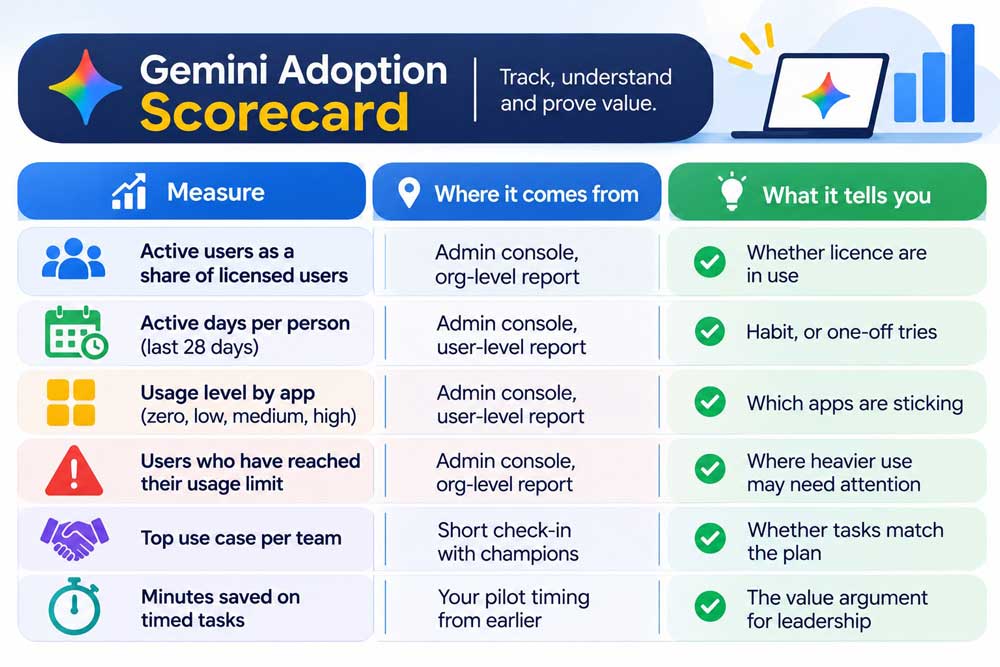
Back to Meridian, with a plan.
Before buying, Yukta fills in one line per team: sales follow-ups, support first drafts, finance reports, HR onboarding checklists. Each team nominates a champion, and day 28 goes on the calendar. When the report arrives, the conversation starts from a plan rather than from a surprise.
One thing that favors planning early: these reports exist inside a managed Workspace admin console. A team on personal email accounts has no such view, which is one more reason onboarding comes before AI.
Adoption also stalls when leadership isn’t sure the data is safe, so is it? Let’s see.
Is Gemini Safe For Business Data?
On a managed Google Workspace account, Google states that your organization’s content isn’t used to train Gemini or other models outside your organization without permission, and admins get controls and logs. How safe it is in practice also depends on your settings, your sharing habits, and what people paste into prompts.
The product’s promises are one half of the answer. The other half is what your own setup lets Gemini reach. An assistant that searches your files makes over-shared folders easier to stumble on, so a rollout is a good moment to tidy sharing.
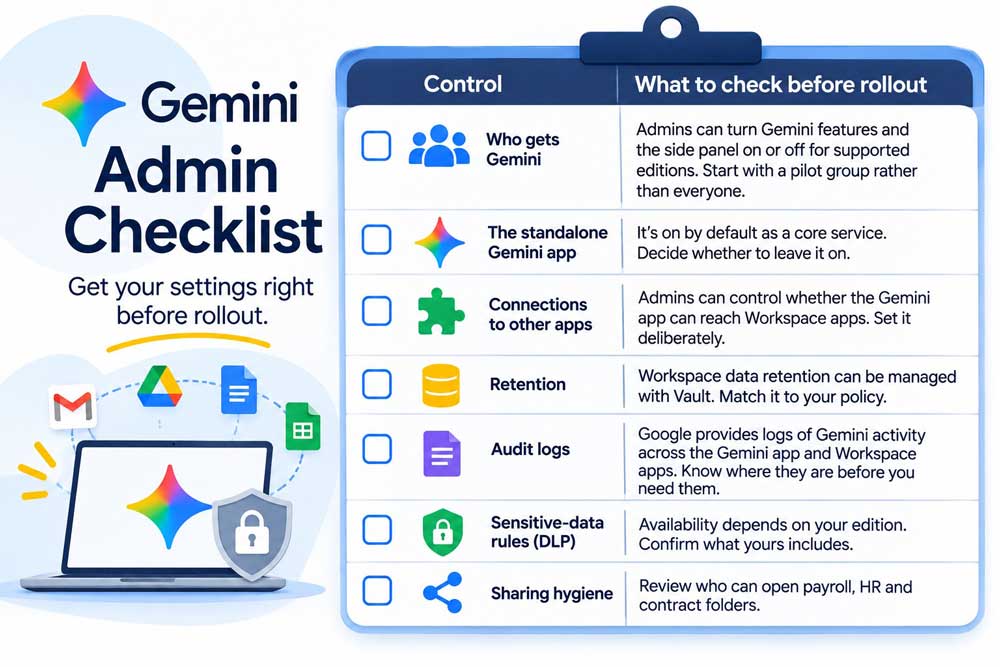
Rules your team can follow from day one
- Keep passwords, API keys, and credentials out of prompts.
- Don’t paste customer personal data unless your policy allows it.
- Treat every output as a draft that a person reviews.
- When unsure whether something is sensitive, ask the admin.
Questions to ask your IT lead or partner
- Which of our plan’s controls are switched on today?
- Who can see Gemini activity logs?
- Who owns the retention rules?
- Do we have contractual or regulatory duties that need advice from our legal adviser?
Just to be transparent, this is general information any team should look into, not legal advice.
Back to Meridian… The finance lead asks the question out loud: “What happens to payroll data?” The tech lead, who acts as admin, reviews who can open the payroll folders, finds a few broader permissions than needed, and tightens them. Gemini starts with sales, support, and operations, and finance joins once the folder review is done.
If the answers are acceptable, the practical hurdle is moving mail, files, and people across.
How Do You Migrate To Google Workspace From Personal Email Or Microsoft 365?
To migrate to Google Workspace, you set up your domain and user accounts, copy mail, calendars, and contacts across with Google’s migration tools, move files as a separate step, then switch your mail over on a planned cutover day. Most of the risk sits in the details around that: folder structures, shared files, signatures, and the day inboxes change.
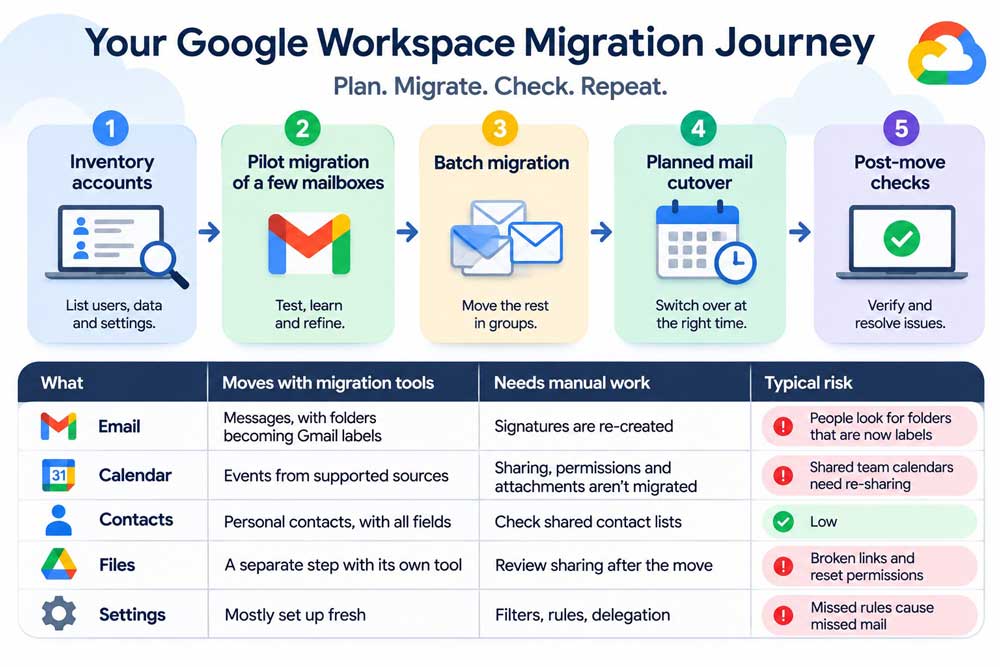
A cutover checklist
- List every account, mailbox size, and shared inbox, such as orders or support.
- Set up and verify your domain, then create user accounts.
- Migrate two or three mailboxes first and check them with their owners.
- Migrate mail, calendars, and contacts in batches.
- Move shared files and review who can open what.
- Switch mail routing at a planned, quiet time.
- Tell people what changes: new sign-in, labels instead of folders, new signature.
- After cutover, sample mailboxes and keep help close for the first days.
What drives the timeline? The number of mailboxes, how large they are, how much file data moves, how many shared inboxes and calendars exist, and how much training people need. Ask any partner whether migration support is included in the quotation or scoped separately. Plan pricing itself is set by Google.
The biggest change isn’t technical; addresses move to your company domain, and people have to start using them. Done well, customers keep reaching you while the old addresses forward for a transition period. If you’re comparing business email solutions in Mumbai, ask the Google Workspace provider how addresses, forwarding, and cutover day are handled, and who is on hand when someone can’t find an old message.
Moving the other way
If your team is already on Microsoft 365, the same pattern applies: Exchange mailbox data moves with Google’s tools, and OneDrive files need their own step. Going from personal email to Microsoft 365 follows the same shape, but what moves depends on the method. Microsoft’s IMAP method, for example, moves mail only, so contacts and calendars need another route.
Back to Meridian. The tech lead lists the 80 personal accounts and finds six shared team inboxes living inside individual people’s Gmail, including orders and support. Moving those safely becomes the first job, ahead of any individual mailbox. Before committing, it’s fair to ask whether Microsoft 365 would be the better fit.
Google Workspace Vs Microsoft 365: Which Is Right For Your Team?
Both are capable business suites, and the right one depends on how your team actually works. Google Workspace tends to suit teams that work mostly in the browser and want AI included in the plan, while Microsoft 365 tends to suit teams that live in desktop Office apps, Excel models, and Windows-managed devices.
Google Workspace provides Gemini, and Microsoft 365 provides Copilot. Neither is a “wrong” choice, but each rewards a different way of working.
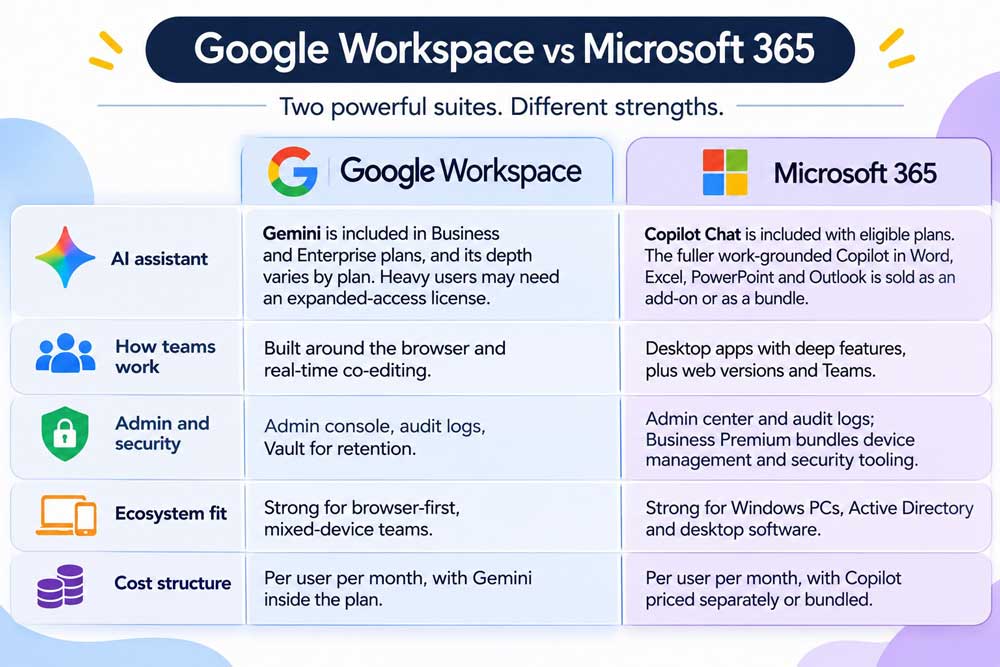
Where Microsoft 365 is stronger
- Excel-heavy work. Large models, macros and long-standing workbooks run most naturally in Excel itself.
- Deep desktop Office use. Teams that rely on advanced formatting, templates and add-ins in desktop apps will feel at home.
- Windows and Active Directory estates. If your devices and sign-ins are already managed that way, Microsoft 365 fits in with less rework.
Where Google Workspace is stronger
- Shared, browser-first work. Documents, sheets, and decks edited together in one place, on any device.
- AI inside the plan. Gemini comes with the plan, so more of the team can try it without a separate purchase decision.
- Simpler day-to-day administration for teams without a dedicated IT group. This is a general tendency; it varies by team.
Four questions to decide
- Does your team work mostly in a browser, or in desktop apps?
- Do you depend on Excel models, macros, or desktop-only software?
- Are your devices and sign-ins already Windows-managed?
- Which of the tasks on your pilot list work better in each suite? Test the real ones.
Choose Google Workspace if your team is browser-first, shares and co-edits constantly, and wants AI available across the plan from the start.
Choose Microsoft 365 if your work depends on Excel models, desktop Office features, or a Windows and Active Directory setup you’d rather keep.
Back to Meridian. The finance lead argues for Excel, so the team tests her month-end model and the weekly sales sheet in a pilot. Most of it translates well. One macro-driven workbook doesn’t. Because Meridian is browser-first, with no Windows domain to preserve, the team chooses Google Workspace and adds that one workbook to a rebuild list. A different company, with a Windows estate and Excel at its core, could reasonably choose the other way.
Either way, onboarding comes first, and AI follows. A Microsoft 365 Partner in Mumbai that also supports Google Workspace can advise on both without a bias toward either.
Once the platform is decided, the next choice is who helps you set it up.
How Do You Choose A Google Workspace Partner In Mumbai?
A good Google Workspace partner in Mumbai is one that can explain, before you sign, who handles each step: consultation, quotation, payment, setup, support, and renewal. The clearest test is a simple question: what happens when the problem is on Google’s side, not yours?
Meridian’s Yukta learns this the practical way. Having settled on Google Workspace, she asks two partners the same questions. One answers each in plain words. The other stays vague on billing and escalation. The question that decides it is: what happens when it’s Google’s problem?
Back to that forty-message thread
Yukta started with a long supplier thread and four questions nobody could answer. They have answers now, and none of them required a leap of faith.
Where do we begin? With a managed account, two or three repeat tasks per team, and one champion each. Gemini comes after onboarding, not before.
What does it cost? The extra cost of the plan that gives you the Gemini depth you want, set against the hours it returns. Google sets the price. Your pilot sets the value.
Is it safe? Google documents its controls, and your settings, sharing habits, and prompt rules do the rest.
Who do we call? That last question matters more than it sounds. The migration, the first week’s questions, and the day something breaks on a Monday all need a name and a process behind them.
If you’re at that point, standing where Meridian started, with personal email, a mixed setup, or a Microsoft 365 plan you’re reconsidering, Tizzy Cloud can help you choose between Google Workspace and Microsoft 365, onboard, migrate, and support you afterwards. Billing is annual, and a GST invoice is issued. Tizzy Cloud is an authorised Google Workspace Reseller, who handles things differently; visit their website to know more.
FAQ
Is Gemini for Google Workspace included in our plan, or is it an extra cost?
Google includes Gemini in its Business and Enterprise Workspace plans rather than selling it as a separate subscription, but how much of it you get depends on the plan. Heavy users may also need an expanded-access license. Plan pricing is set by Google, so confirm current details with your partner or Google’s plan page before you decide.
How long does it take to migrate to Google Workspace for 50 to 100 people?
It depends on how many mailboxes you have, how large they are, how much file data moves, and how many shared inboxes and calendars need care. A partner should give you an estimate after reviewing your setup. A pilot of two or three mailboxes first shows what the full move will look like.
Does the Google Workspace vs Microsoft 365 decision change how we roll out AI?
Not the approach. Naming use cases, picking champions, short training sessions, and a measured review apply to Copilot as much as to Gemini. What differs is packaging: Gemini is included in Google’s plans, with depth varying by plan, while Microsoft sells the fuller Copilot as an add-on or a bundle. Compare both quotes against your own pilot task list.
Do we need a partner, or can we buy directly?
You can buy directly from Google or through an authorized reseller, and Google’s help describes subscription management moving between the two. A partner adds consultation, onboarding, migration, technical support, and renewal support, while plan pricing stays as Google sets it. If you’re weighing a Google Workspace partner in Mumbai, check authorization in Google’s Partner Search Directory first, then ask the questions in the partner checklist above.
Can we trust what Gemini writes?
Treat it as a strong first draft, not a final answer. Gemini can misread a long thread or fill a gap with a plausible guess, so check dates, numbers and commitments against the source, and keep a person accountable for every decision. The “check” line in each app example above is the habit worth building.
